

The Spatial Dimensions Articles page now lets you search every guide, price and news story in one box, and narrow the list by who you are (architect, engineer, contractor and seven more), by sector (eleven, from Education to Retail) and by topic (twelve, from Measured building to Underground utilities). Every filtered view has its own web address, so you can bookmark it or send it to a colleague. Each article now has a contents list, related reading and a direct line to a quote.
Why did we change the Articles page?
We changed it because it had become hard to find anything. Spatial Dimensions has been writing about surveys since 2022, and the page simply listed everything newest first: price guides next to team news, heritage pieces next to utility mapping. If you were an architect looking for help specifying a measured survey, you had to scroll past a lot to find it.
The new page starts from the question you arrived with. Tell it who you are, what sector you work in or what you want to know about, and it shows you the articles written for that.
How do I search for an article?
Type a few words into the search box under “What do you need to know?” and the list updates as you type. Try something plain, such as “survey cost”, “utility mapping” or “retrofit”. A match count shows how many articles fit, and Clear filters takes you back to everything.
Search looks at article titles and summaries. If a word doesn’t bring up what you expected, try the filters below instead, because every article is labelled by sector, topic and audience.
 READ NEXTTHANK YOU & GOODBYE TO RU HARRIS!
How do the filters work?
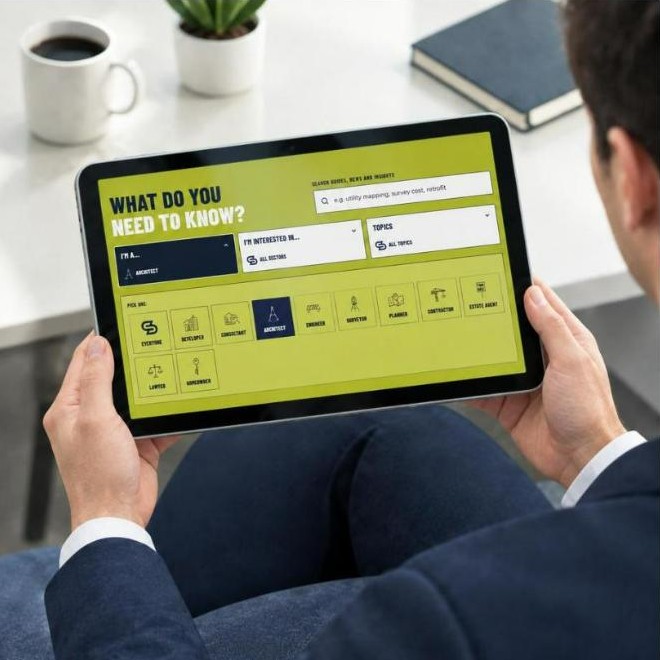
There are three filters, each a single pick:
- I’m a… shows the articles written for your role: Architect, Engineer, Consultant, Contractor, Planner, Developer, Surveyor, Estate agent, Lawyer or Homeowner. Leave it on Everyone to see the lot.
- I’m interested in… narrows by sector: Education, Healthcare, Heritage, Hospitality, Industrial, Sports & Leisure, Office, Public Sector, Residential, Retrofit or Retail.
- Topics narrows by subject: Measured building, Topographical, Underground utilities, Laser scanning & point clouds, 3D modelling & BIM, Drones, Verification & monitoring, Planning & regulation, Sustainability, Buying a survey, Industry insight or Company news.
The filters work together. Pick Architect and Heritage, for example, and you get only the heritage articles we have written with architects in mind. Change one pick and the list changes with it.
Can I save or share a filtered view?
Yes. Every search and every filter is written into the page’s web address, so the view you are looking at is a link you can keep. An engineer who works mostly in healthcare can bookmark that view and come back to the latest articles in one click. A project lead can send the “Buying a survey” view to a client who is about to commission their first survey.
PLANNING A PROJECT?
Tell us about your site and what you need, and we will come back to you with a quote.
What has changed on the articles themselves?
Each article now has a sidebar with three things in it:
- In this article: a contents list, so you can jump straight to the section you need, whether that is the price table or the FAQs.
- A route to a quote: a Get a quote button and our number, 01732 458799, without leaving the page.
- More on the same topic: three related articles and a link to see the rest.
At the foot of every article, Keep reading suggests what to look at next.
What will I find on the page?
Three kinds of article, labelled on every card:
- Guides explain how to specify and buy a survey: what to ask for, how accurate it will be and what it costs. Spatial Dimensions publishes its survey prices, and the guides use them.
- Insights look at what is happening in a sector, such as office retrofit in London or university estates, and where surveys fit.
- News covers the company: new people, new services and what the team is up to.
We publish new articles every week, and the most useful ones are pinned at the top of the page.
How do I get new articles by email?
Use the sign-up box below. Enter your work email address and we will send you a short round-up of new guides and news. One field, nothing else to fill in, and you can unsubscribe from any email.
The box asks for a work address. It won’t accept personal addresses such as Gmail or Hotmail, because the round-up is written for people commissioning and designing around surveys at work.
A short round-up of new guides and news.
Work addresses only. Privacy notice
Where should I start?
If you are new to buying surveys, start with Buying a survey in the Topics filter. It brings together our price guide, our checklist for choosing a survey provider and our Survey Buyers Guide.
If you have a project in mind, call us on 01732 458799 or get in touch and we will come back with a written quote within 24 hours.
Not ready to talk yet? Download the Survey Buyers Guide and take it at your own pace.
Articles page FAQs
Where is the Spatial Dimensions Articles page?
At spatial-dimensions.co.uk/resources/articles/, or under Resources, then Articles, in the main menu. The latest articles also appear on the home page.
Can I see only the articles for my job?
Yes. Use the I’m a… filter and pick your role: Architect, Engineer, Consultant, Contractor, Planner, Developer, Surveyor, Estate agent, Lawyer or Homeowner.
Can I combine filters?
Yes. Role, sector and topic work together, one pick in each. Architect plus Heritage, for example, shows heritage articles written for architects.
Can I send a filtered list to a colleague?
Yes. Each search and filter is saved in the page’s web address, so copy the address from your browser and send it.
Where are the survey prices?
Pick Buying a survey in the Topics filter. It brings up our UK survey price guide and our checklist for choosing a survey provider.
How do I get new articles by email?
Enter your work email address in the sign-up box on the Articles page. Personal addresses such as Gmail or Hotmail aren’t accepted, and you can unsubscribe from any email.


 DEVELOPER
 CONSULTANT
 ARCHITECT
 ENGINEER
 SURVEYOR
 PLANNER
 CONTRACTOR
 ESTATE AGENT
 LAWYER
 HOMEOWNER